Showing posts with label program. Show all posts

Tuesday, June 14, 2022

Caesar Cipher and other stuff

Day 002: Caesar Cipher

How to implement Caesar cipher and other stuff.


There is an old programming exercise to implement a simple string transformation. Of course, for beginners, it's too hard to understand, so the programming task is dumbed down. The problem is, the usual solution are implemented using ASCII chart calculation. I don't know about you, but I think a simple character array implementation is much more suitable to beginners. 


And if you have been using Unix/Linux for a while, I'm sure you wonder just how difficult it is to implement some of the programs. Sure, the source code is out there, but how about a simple one for learning purposes? Therefore, I decided to just implement a simple cipher program. As a bonus, I decided to have a user configurable keys, so that the cipher isn't limited to A=3 as in traditional Caesar cipher.


The program will take 2 string parameters, called Set1 and Set2. This will determine the plain text, and the key. To use it as Caesar cipher, do it like this:


caesar abcdefghijklmnopqrstuvwxyz cdefghijklmnopqrstuvwxyzab


That's all there is to it. Speaking of which, there is another encoding technique that is quite standard, called ROT13. ROT13 is basically Caesar cipher shifted 13 places. You use it like this:


caesar abcdefghijklmnopqrstuvwxyz nopqrstuvwxyzabcdefghijklm


As you can see, by having both the plain text and the key be provided to the program, you can easily change the cipher without too much fuss!


Another way to use this program is to use it either to lower case, or to upper case. Like so:


caesar ABCDEFGHIJKLMNOPQRSTUVWXYZ abcdefghijklmnopqrstuvwxyz

caesar abcdefghijklmnopqrstuvwxyz ABCDEFGHIJKLMNOPQRSTUVWXYZ


Pretty neat! You can even reverse the alphabet for some unique writings:


caesar abcdefghijklmnopqrstuvwxyz zyxwvutsrqponmlkjihgfedcba


And if you mix the alphabet just so, you may even come up with some alien sounding words:


caesar abcdefghijklmnopqrstuvwxyz alienssoundingoratoryz


If you notice, the last example has a shortened key. That is intentional. You don't have to provide a direct match just to have fun! "Hello Sailor!" becomes "Hniio Sauiot!", it's just enough weirdness without being to alien to recognize.


And if you have been following the capabilities so far, I suggest that you take it to the next step and study a standard program called "tr", which is what this is all about.


#include <stdio.h>
#include <stdlib.h>
#include <string.h> 

int tr(char Set1[],char Set2[]) {
  int i,j,c; char *p;
  j=strlen(Set2);
  while ((c=getchar())!=EOF) {
    i=(p=strchr(Set1,c))-Set1;
    i=(i<j)?i:j-1;
    if (p) putchar(Set2[i]);
    else   putchar(c);
  }
  return 0;
} 

int main (int argc, char *argv[] ) {
  if   (argc<3) puts("Usage: tr SET1 SET2\n");
  else tr(argv[1],argv[2]);
  return 0;
}


One last thing: You can use this to delete characters from the text. Suppose you want to eliminate vowels from the text. You can do it this way: 


caesar aeiou ''

caesar aeiou '_' <test.txt | sed "s/_ */_/g" | sed "s/_//g"


The quotes specify empty string, and this will delete the characters no problem. Quite an interesting capability. Couple it with some judicious regex, and you have a nice vowel remover, indeed!


Friday, December 6, 2013

Petit Computer Journal #28

Petit BrainF

Yeah, I was wondering just exactly how hard it is to implement a language that has only 8 operators involved. Not hard at all! Of course, I cheated and used graphic screens for my memory. It'll be probably a bit more complicated if I use straight memory. A bit.

The program cannot fit into one screen, but it's certainly a candidate for less than 100 lines program. It took me a couple hours because I was careless in moving the pointers.

The CYCLE subroutine is there to keep the variables within range, and the FB subroutine is there as a debugger that I use when debugging the program. So, I commented it out in the final version.

Another person, IAmAPersson (what a name!) was working on a version of the compiler as well. Check Petit Wikia for it. Maybe he posted it there by now.

I don't know the policy of this blogspot, but I know my policy and that is family friendly. I don't want to use the full name of the program. Thank you. Next time you designed a programming language, make sure you name it proper!


  1. REM PBF BY HARRY HARDJONO
  2. @INIT
  3. ACLS:CLEAR
  4. GPAGE 0:GCLS
  5. GPAGE 1:GCLS
  6. MS=30000
  7. PTR=0
  8. PC=0
  9. MPC=0
  10. CSR=0

  11. GPAGE1:RESTORE @HELLO
  12. @LOADP
  13. READ A$
  14. IF A$=="" GOTO @RUNP
  15. FOR I=0 TO LEN(A$)-1
  16. GPSET PC%256,PC/256,ASC(MID$(A$,I,1))
  17. PC=PC+1:NEXT
  18. GOTO @LOADP

  19. @RUNP
  20. PC=0:GPAGE 0
  21. @LOOP
  22. GPAGE 0:VAR=GSPOIT(PTR%256,PTR/256)
  23. GPAGE 1:C=GSPOIT(PC%256,PC/256)
  24. 'GOSUB @FB
  25. IF C==62 THEN PTR=PTR+1:GOSUB @CYCLE:GOTO @LOOP2 
  26. IF C==60 THEN PTR=PTR-1:GOSUB @CYCLE:GOTO @LOOP2
  27. IF C==43 THEN VAR=VAR+1:GOSUB @CYCLE
  28. IF C==45 THEN VAR=VAR-1:GOSUB @CYCLE
  29. IF C==46 THEN LOCATE CSR%32,CSR/32:?CHR$(VAR);:CSR=CSR+1:GOTO @LOOP2
  30. IF C==44 THEN GOSUB @GETCHAR 
  31. IF C==91 THEN MPC=1:GOSUB @SR:GOTO @LOOP2
  32. IF C==93 THEN MPC=1:GOSUB @SL:GOTO @LOOP2
  33. IF C==0 GOTO @END 
  34. GPAGE 0:GPSET PTR%256,PTR/256,VAR
  35. @LOOP2
  36. PC=PC+1:GOSUB @CYCLE
  37. GOTO @LOOP

  38. @FB
  39. LOCATE 0,5:?PTR,PC,VAR
  40. LOCATE 0,6:?CHR$(C)
  41. WAIT 6
  42. RETURN

  43. @CYCLE
  44. IF PC<0 THEN PC=PC+49152
  45. IF PTR<0 THEN PTR=PTR+MS
  46. IF VAR<0 THEN VAR=VAR+256
  47. PC=PC%49152
  48. PTR=PTR%MS
  49. VAR=VAR%256
  50. CSR=CSR%768
  51. RETURN

  52. @GETCHAR
  53. A$=INKEY$():IF A$=="" GOTO @GETCHAR
  54. VAR=ASC(A$):WAIT 30
  55. RETURN

  56. @SR
  57. IF VAR!=0 THEN RETURN
  58. PC=PC+1:GOSUB @CYCLE
  59. GPAGE 1:C=GSPOIT(PC%256,PC/256)
  60. IF C==91 THEN MPC=MPC+1
  61. IF C==93 THEN MPC=MPC-1
  62. IF MPC<=0 THEN RETURN
  63. GOTO @SR

  64. @SL
  65. IF VAR==0 THEN RETURN
  66. PC=PC+1:GOSUB @CYCLE
  67. GPAGE 1:C=GSPOIT(PC%256,PC/256)
  68. IF C==91 THEN MPC=MPC-1
  69. IF C==93 THEN MPC=MPC+1
  70. IF MPC<=0 THEN RETURN
  71. GOTO @SL

  72. @END
  73. WAIT 600
  74. END

  75. @PLOP
  76. DATA "-[>-[.-]<]"
  77. DATA ">>++++[.->++++++[.-]<]"
  78. DATA ""

  79. @CAT
  80. DATA ",[.,]"
  81. DATA ""

  82. @HELLO
  83. DATA "+++++ +++++ [>+++++++"
  84. DATA ">+++++ +++++ >+++ >+ <<<<-]"
  85. DATA ">++.>+.+++++++ ..+++.>++.<<"
  86. DATA "+++++ +++++ +++++"
  87. DATA ".>.+++. ------ .----- --- .>+.>."
  88. DATA ""


Tuesday, September 3, 2013

Raspberry Pi Journal #18

Installing MTPAINT

After my disastrous experience with GIMP, I tried a different tack. I downloaded mtpaint.

sudo apt-get install mtpaint

And it installed no problem. I see mtPaint under Graphics menu. So I set out to use it. It's pretty simple to use.


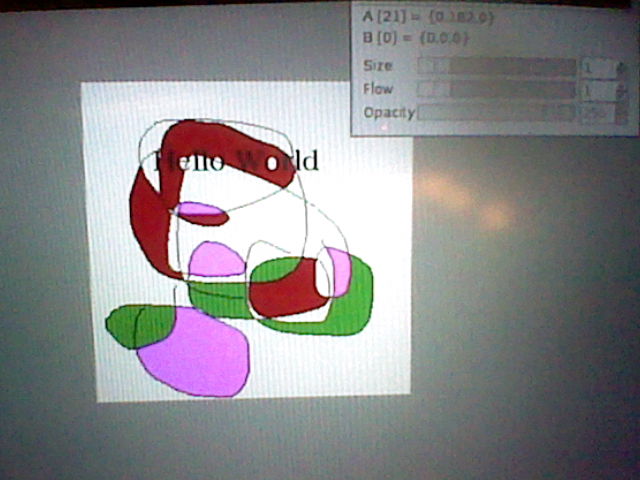
Oh, look! Colors! I can do coloring with this program! Okay, so maybe that's not a big deal, but I was having trouble with GIMP, remember?


And adding text is not a problem either. Looks like I mastered this program already, and it's not even 15 minutes. That's my kind of program!


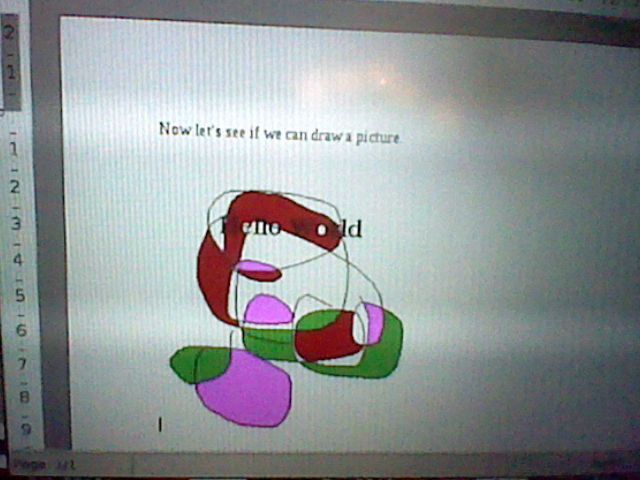
Now that I've done experimenting, let's see if we can do something nice. Let's put a picture on an AbiWord document. Create new picture.


Do a quick classical masterpiece. Add some text. Put colors in. All in all, a great and wonderful new art work. Done in less than 5 minutes! What a deal!


There it is in AbiWord. Looks like adding a picture is not a problem at all. There's only one thing to do now, and that is print it out.


Ta-da! That's how I want it done. Too bad my laser printer isn't color, but I don't expect miracles. There's always crayon if I want color, right?

Adding picture to word processor: Done!


Monday, September 2, 2013

Raspberry Pi Journal #17

Installing GIMP


Now that I have AbiWord, the next thing I want to have would be a paint program. GIMP fit the bill, so I installed it next:

sudo apt-get install gimp

Easy enough to do. Not a problem.


That's the logo you'll see when you download Gimp. Pretty neat, eh?


Okay. Here's the first problem. I don't know what to do. Sure GIMP is very powerful, but the user interface is kind of cryptic. I'm having trouble doing everything. I did play around with it, but nothing too fancy.


I can't even choose color! How bad is that? Not to mention, I missed my Wacom tablet. Oh, dear. I must rethink this over. I was hoping there'd be an easy integration with AbiWord. If there is, I never did find it.


This is the message that I get when I quit the program. I don't know what happens here, but I don't like it. Oh, well. I guess GIMP and raspberry pi are not compatible with one another. Too bad.