Showing posts with label 17. Show all posts

Thursday, January 2, 2014

Book Review #17


Book #17 Nasty People
Jay Carter

To call this little booklet a "seminal work in literature" maybe overselling it, but not by much.

I wonder what possesed me to pick up this little hardcover book dealing with one, just one, personality. And yet, as I read this book, I felt compelled to take it home with me, and I did. The fact that I can pick up this old book for $2.99 must have figured in the process. I read it, I took it home, and promptly forgot about it.

That is, until a few days later, when somebody who actually fit the description perfectly started berating me for parking at the same parking spot I've been parking for years. It's amazing as how perfect the description is. I use the techniques outlined in the book, and defused the person. The next day, I called the owner of the parking lot, explained the situation, and showed him the book. After the owner talked to the person, I showed him the pages where the characteristic matches. He was impressed. "You mean you pick this book just a few days ago?" Yup. Talk about lucky break!

So, I managed to solve the situation very well. I have since run across another person like that. In life, there are many such persons. Some are merely temporary. Others are more permanent. This book will not help such nasty person, called "invalidator", to lead a better life. But it will save you from grief whenever you meet with them. Highly recommended.

Monday, December 16, 2013

Cooking Journal #17


Rolled Sushi


If you are interested in sushi at all, you probably have one of those sushi making kit. The truth is, you don't really need it. But if you have it, I'll show you how to do it real quick.

You need nori sheet. That's seaweed. I bought the cheap kind, which is not what you want. You want the nice flat kind with smooth surface on one side. Mine, as you can see, is bumpy all over.


Lay down the nori sheet on bamboo mat, shiny side down. Put rice and meat on top. I use spicy hot dog cut length-wise. If you want, you can add some veggies like cut carrots or celery sticks. You can use condiment. I like to use sriracha on mine. No need to use wasabi on it unless you crave authenticity.


Roll the sushi using bamboo mat. The most important point is to press evenly along the spine. Firm enough to press the rice, but not so hard as to compress them solid. By the way, use two hands while doing it. My other hand was holding the camera.

Also, I should tell you that the bamboo mat is optional. One time, I was doing it, and I realized that I forgot to put the mat under the sheet. So what I did was pick up the paper towel and roll the sheet with it. Works just fine, although not as easy as with the mat.

Wet the end of the sheet so that it sticks together when rolled over.


And that's what you should have. One rolled sushi.


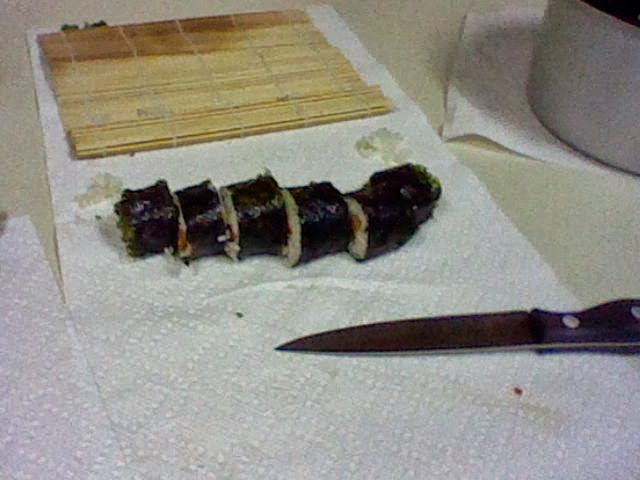
Cut into six equal length. Notice that I'm using a proper kitchen knife for this. Buck knife is not good enough for this. To be honest, even this sharp kitchen knife is less than ideal. The sharper the knife, the better! Use the sharpest knife you have, and use it only for cutting sushi rolls!


That's the result, and I can tell you that spicy hot-dog makes a good substitute for avocado used in California Rolls. Serve on plate with pickled ginger. I have yet to find a good substitute for pickled ginger. So that and the nori seaweed are the two must have ingredient for a good rolled sushi.

Saturday, December 14, 2013

Nintendo Journal #17


Automatic Blood Pressure Monitor


I'm maintaining my blood pressure. So far, I'm keeping 120/80. It has been at that for a long time. However, with good exercise, my recovery rate has improved tremendously. I'm thinking that in order to lower the levels, I must change my diet. Well, I'll have to think about that. Exercise, yes. Diet, less chance of it happening than a snowball in hell!

Friday, September 13, 2013

Petit Computer Journal #17

WITCH

I wrote WITCH to showcase the SPRITE capabilities of Petit Computer. There are lots of people who doesn't know how to use sprites. In fact, Petit Computer sprites are so powerful, you can easily replicate old games.

So here is the WITCH program that is purposely SPRITE heavy. There are certain techniques where I could have done it traditionally, but chose to implement it using a sprite instead. Notably, there is a TIMER sprite, where the sole purpose is to spread the bullets so that they don't trip over one another.

I chose the firing of the fireball using stylus because somebody was asking the way to do it. He was wondering about how to fire the bullet in the direction of the stylus, without stopping at the point of the stylus. In my solution, I also took care of the speed of the bullets. Done carelessly, the bullets may have different speed.

'THE WITCH AND THE UNDEAD
'A SPRITE EXERCISE

'1. WITCH
'2. FIREBALL
'3. UNDEAD FALLING
'4. UNDEAD WALKING
'5. UNDEAD HIT
'6. WITCH HIT
'7. EXTRAS

@INIT
H=100:'HEALTH
NUMZ=1:'CURRENT NUM OF ENEMY
MAXZ=20:'MAXNUM OF ENEMY
SCORE=0

ACLS
PNLTYPE "OFF"
SPSET 1,108,1,0,0,0:'WITCH
SPCOL 1,0,0,16,16,FALSE
SPOFS 1,120,170

'BULLET
FOR I=2 TO 9
SPSET I,142,0,0,0,0
SPANIM I,2,10,0
SPOFS I,30,180,I*90
SPCOL I,0,0,16,16,FALSE,2
NEXT

'CURSOR
SPSET 10,253,1,0,0,0
SPCOL 10,0,0,16,16,FALSE,0

'TIMER
SPSET 11,3,1,0,0,0
SPCOL 11,0,0,16,16,FALSE,0
SPOFS 11,200,200

'UNDEAD
FOR I=20 TO 20+MAXZ
SPSET I,130,RND(16),0,0,0
SPANIM I,2,20,0
SPOFS I,200,-300
SPCOL I,0,0,16,16,FALSE,1+2
NEXT


@MAINLOOP
VSYNC 1:X=TCHX:Y=TCHY:S=TCHST:B=BUTTON(0)
LOCATE 0,0:?"HEALTH=";H;"   ":?"SCORE=";SCORE
SPOFS 10,X,Y
GOSUB @FIREBALL
GOSUB @ENEMY

IF SPHIT(1) THEN H=H-1:BEEP 37
IF B AND 4 THEN DX=-8: GOSUB @MOVE
IF B AND 8 THEN DX=8:GOSUB @MOVE
'IF B AND 16 GOTO @END
IF H<=0 GOTO @END
GOTO @MAINLOOP

@MOVE
SPREAD(1),SX,SY
IF SX+DX>0 AND SX+DX<240 THEN SPOFS 1,SX+DX,SY,8
RETURN

@ENEMY
SPREAD(1),SX,SY
FOR I=20 TO 20+NUMZ
SPREAD(I),ZX,ZY
IF (1 AND SPCHK(i)) GOTO @ENEMY2
IF ZY>SY THEN SPOFS I,SX,SY,SPEED:GOTO @ENEMY2
SPEED=(50000-SCORE)/100:IF SPEED<60 THEN SPEED=60
SPOFS I,RND(255),0
SPOFS I,RND(255),SY+1,SPEED
@ENEMY2
NEXT
RETURN

@FIREBALL
FOR I=2 TO 9
IF SPHIT(I) THEN GOSUB @HITZ
IF !(1 AND SPCHK(I)) THEN SPOFS I,I*18,300
IF S==1 AND !(1 AND SPCHK(11) THEN @SHOOT
NEXT
RETURN

@HITZ
BEEP 14
SPOFS I,80,0
SPOFS SPHITNO,30,-150
SCORE=SCORE+FLOOR(SQR((SPHITX-SX)*(SPHITX-SX)+(SPHITY-SY)*(SPHITY-SY))/3)
NUMZ=FLOOR(SCORE/1000)+1
IF NUMZ>MAXZ THEN NUMZ=MAXZ
RETURN

@SHOOT
CB=((CB+1)%8:CBS=CB+2
IF (1 AND SPCHK(CBS)) GOTO @SHOOT2
BEEP 10:SCORE=SCORE-1:IF SCORE<0 THEN SCORE=0
SPREAD(1),SX,SY
A=ATAN((X-SX),(Y-SY))
SPOFS CBS,SX,SY
SPOFS CBS,SX+300*SIN(A),SY+300*COS(A),150
SPOFS 11,250,250,20
@SHOOT2
RETURN

@END
CLS:?"GAMEOVER"
BGMPLAY 6
WAIT 60
END

Monday, September 2, 2013

Raspberry Pi Journal #17

Installing GIMP


Now that I have AbiWord, the next thing I want to have would be a paint program. GIMP fit the bill, so I installed it next:

sudo apt-get install gimp

Easy enough to do. Not a problem.


That's the logo you'll see when you download Gimp. Pretty neat, eh?


Okay. Here's the first problem. I don't know what to do. Sure GIMP is very powerful, but the user interface is kind of cryptic. I'm having trouble doing everything. I did play around with it, but nothing too fancy.


I can't even choose color! How bad is that? Not to mention, I missed my Wacom tablet. Oh, dear. I must rethink this over. I was hoping there'd be an easy integration with AbiWord. If there is, I never did find it.


This is the message that I get when I quit the program. I don't know what happens here, but I don't like it. Oh, well. I guess GIMP and raspberry pi are not compatible with one another. Too bad.